Barcode labels · Windows · ZPL, TSPL, DPL, CPCL
Barcode labels,madeby the thousand.
Arcenta Barcode Studio creates Code 128, Code 39, EAN-13, EAN-8 and UPC-A barcode labels from a single value or an Excel or CSV file, with your logo on every label, and exports a print-ready PDF sheet or a native file for your thermal label printer. It runs fully offline.
A utility, simply made.
Windows software that turns one value or a whole spreadsheet into print-ready barcode labels: PDF sheets, PNG images, or native ZPL, TSPL, DPL and CPCL files for thermal label printers.
Who it’s for.
Warehouses, manufacturers, retailers and print shops that make barcode labels from spreadsheets, and anyone who prints to Zebra, TSC, Datamax-O’Neil / Honeywell or mobile label printers.
What it takes out of the process.
- No retyping values into a label designer. Import the spreadsheet and Barcode Studio finds the column that holds the unique barcode data.
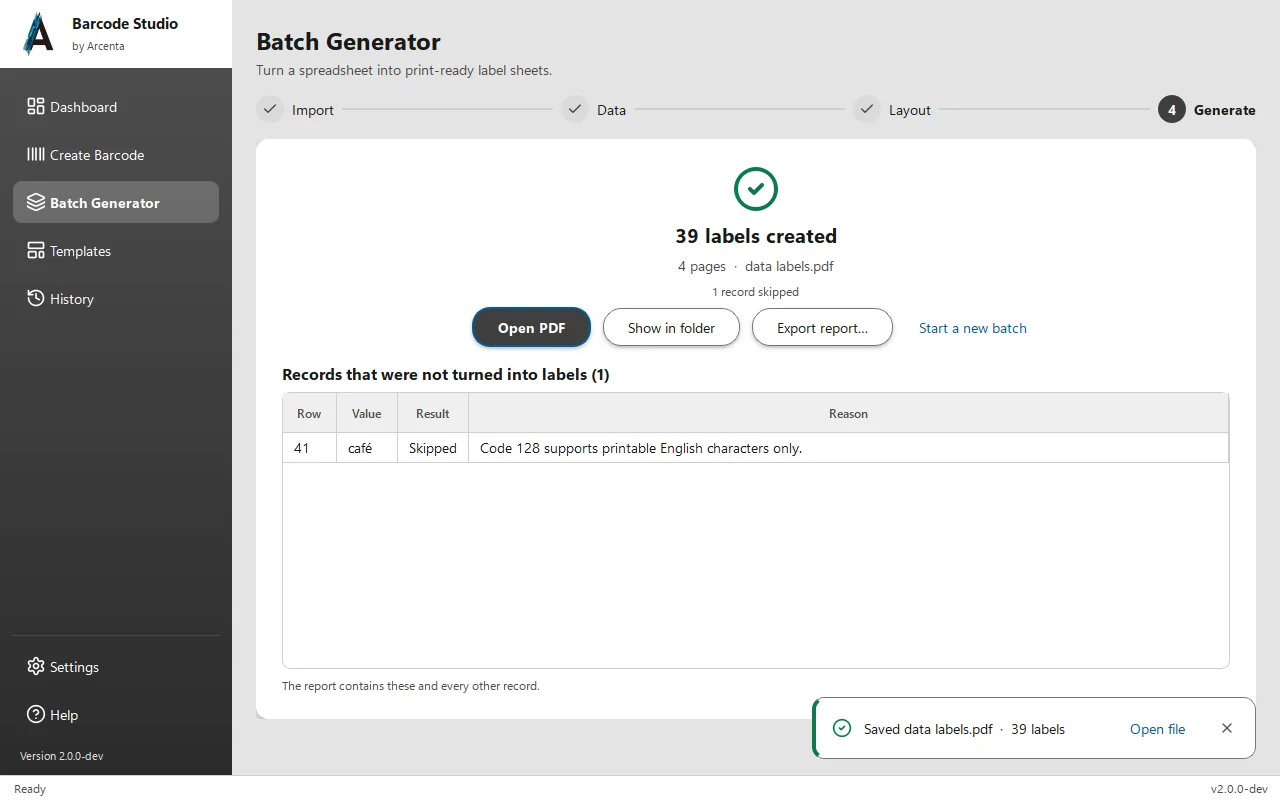
- No bad labels discovered at the printer. Every row is validated first; invalid rows are listed with the reason and skipped.
- No subscription and no cloud. One licence per PC, offline, and nothing you create is sent anywhere.
One model in, one program out.
- 01
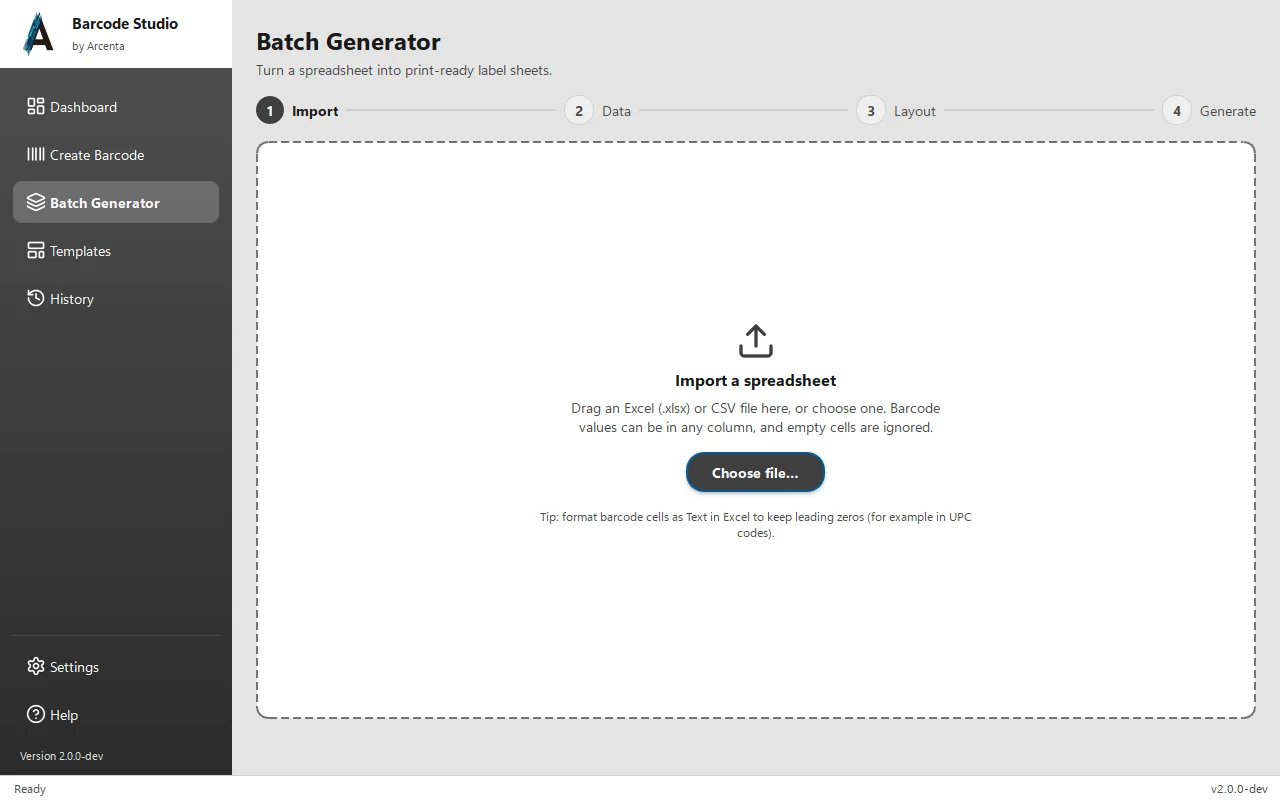
Choose or import
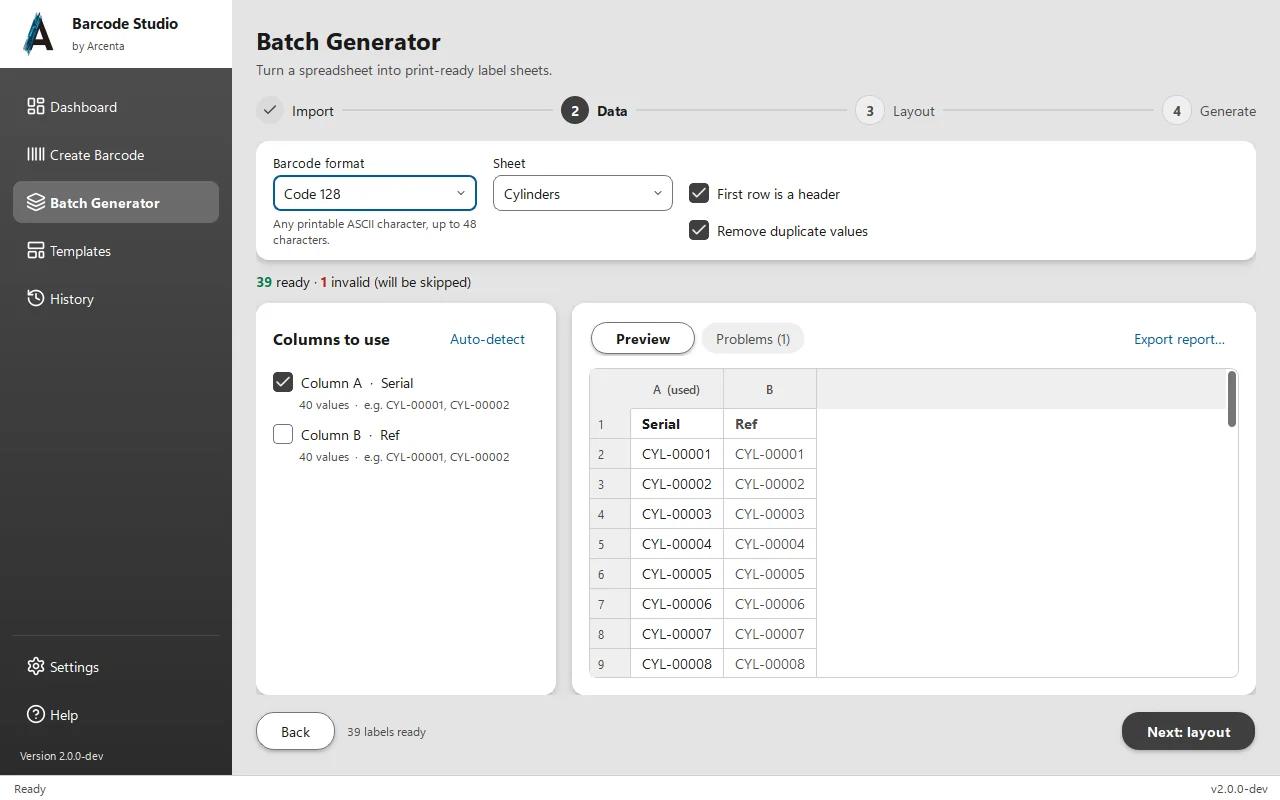
Type one value, or drop in an Excel (.xlsx) or CSV file. Barcode Studio detects which column holds the unique barcode data and skips duplicate or reference columns.
- 02
Validate
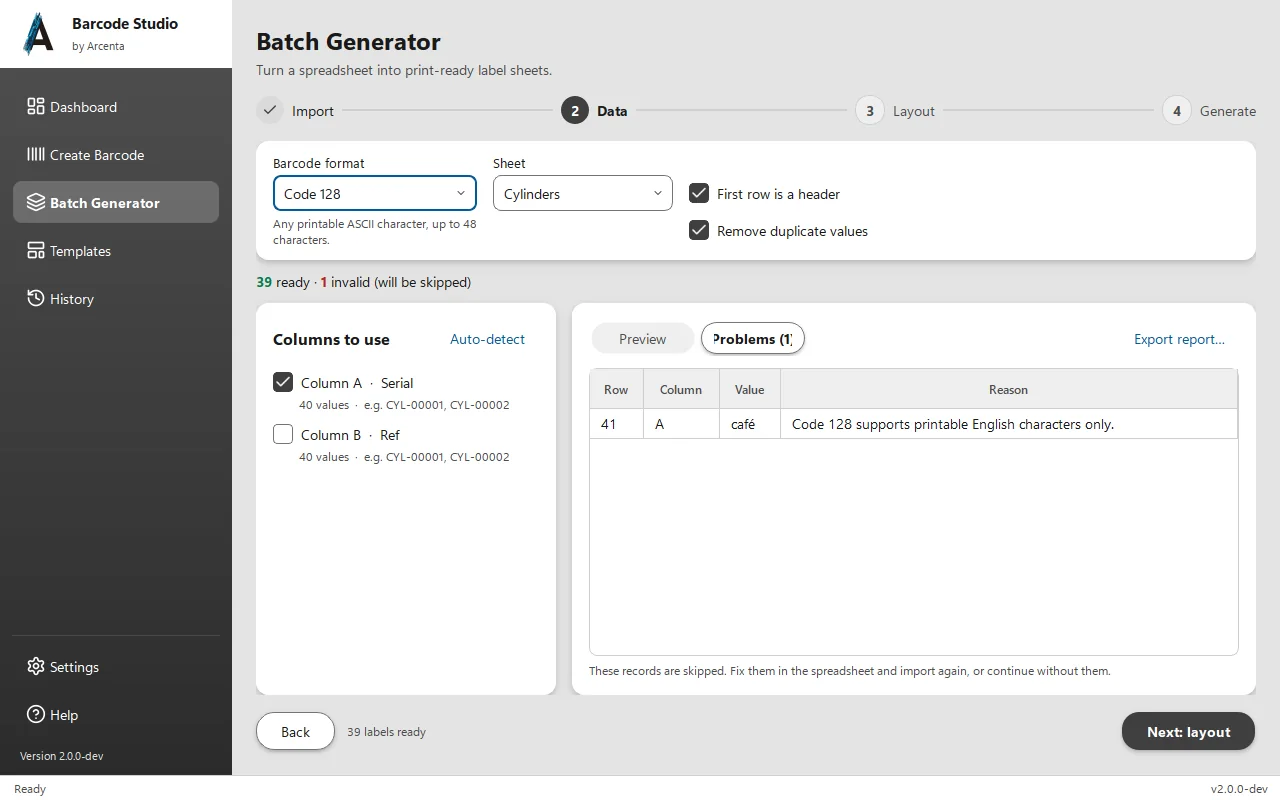
Every row is checked against the barcode type (for example, EAN-13 needs 12 or 13 digits). Problem rows are listed with the reason and skipped, and the report can be exported.
- 03
Design the label
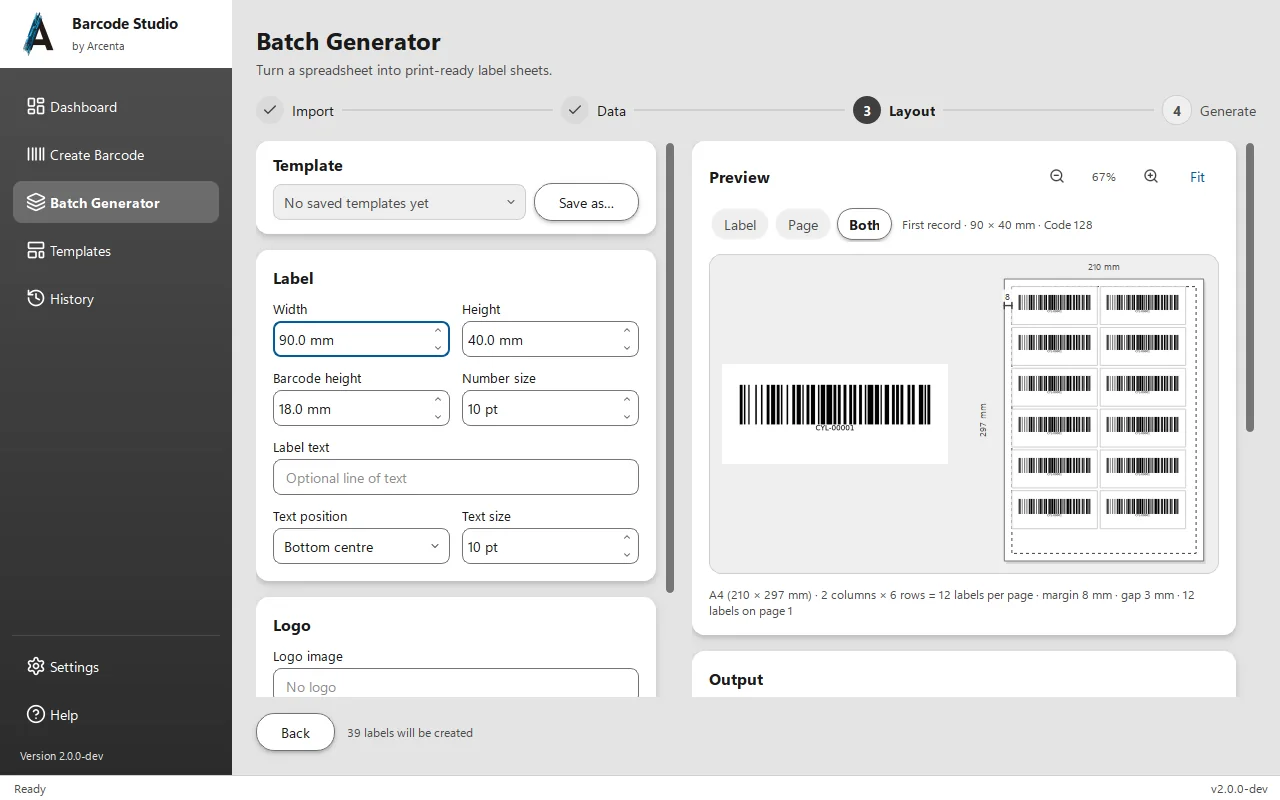
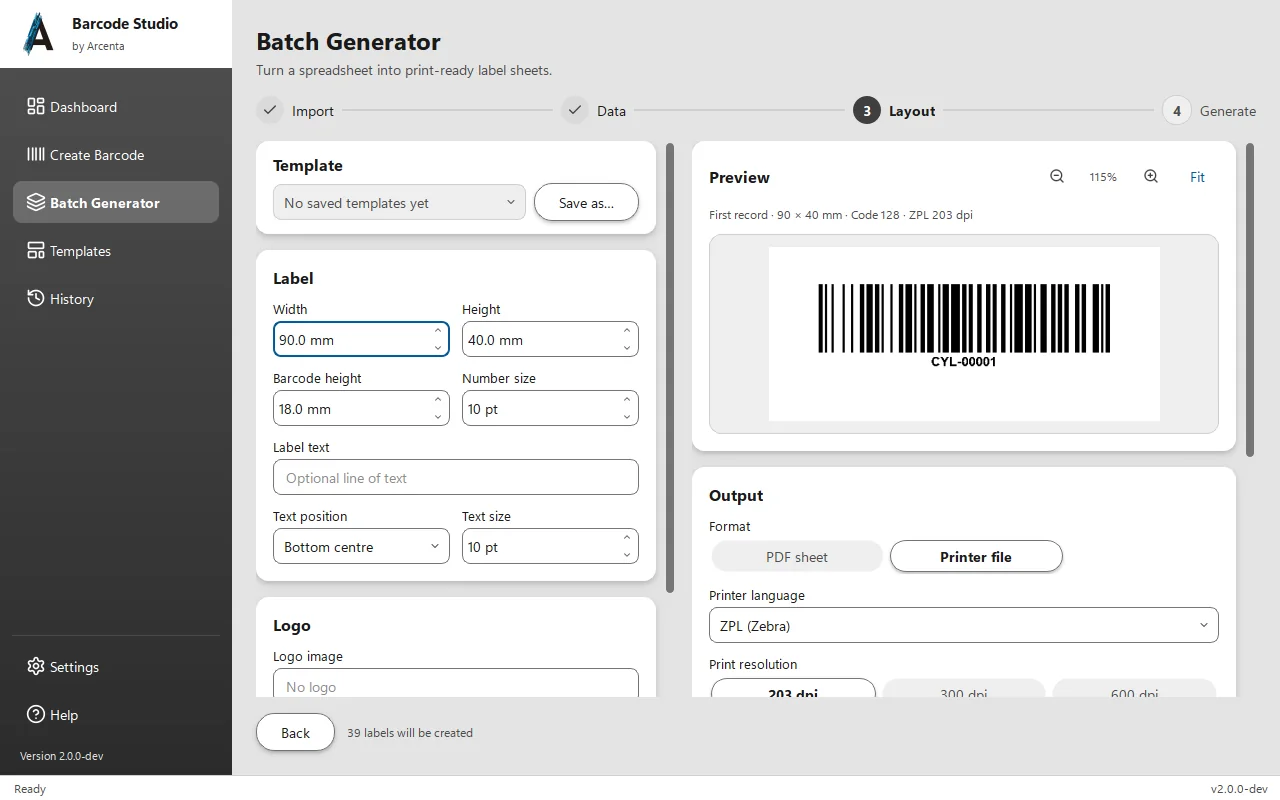
Set label size, barcode height, text, your logo and sheet layout, and watch the live preview. Save it as a template to reuse.
- 04
Export
A multi-label PDF sheet, a PNG image, or a native ZPL, TSPL, DPL or CPCL printer file, with a test label to check orientation first.
See the software.
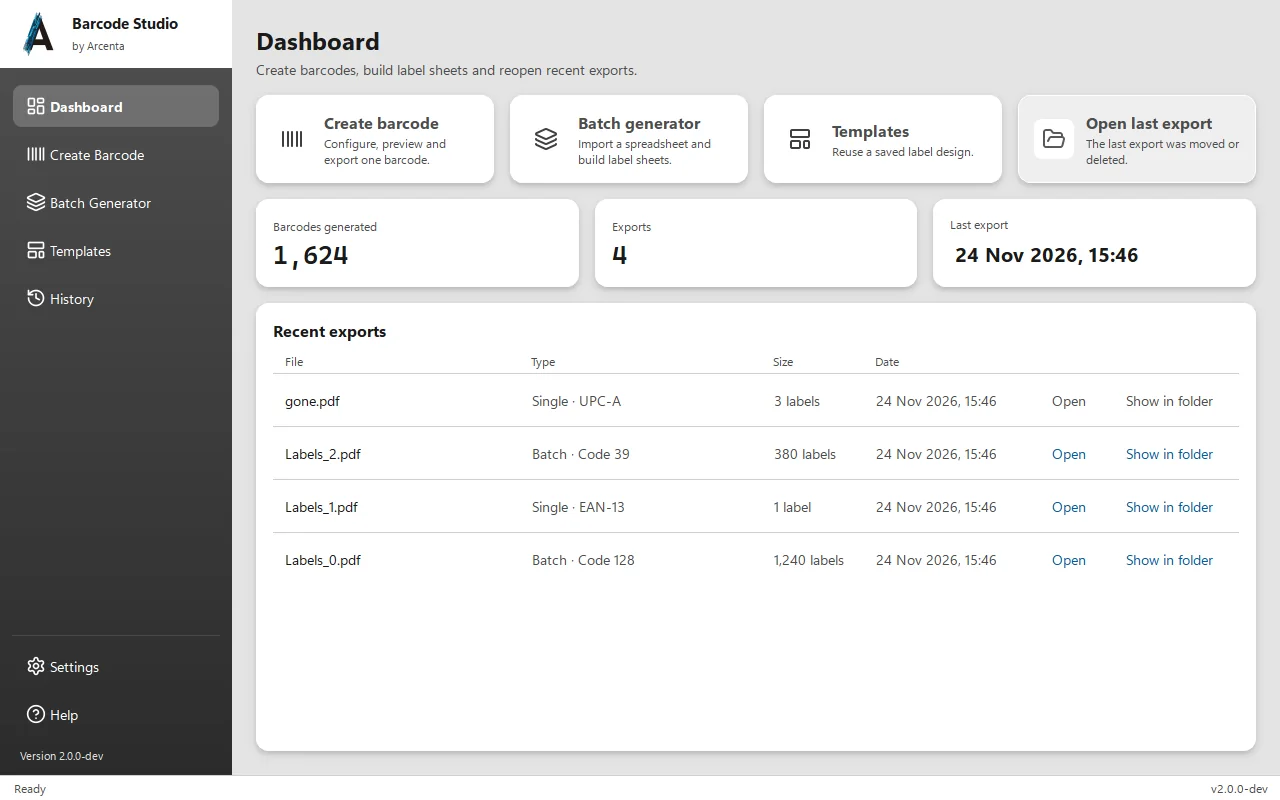
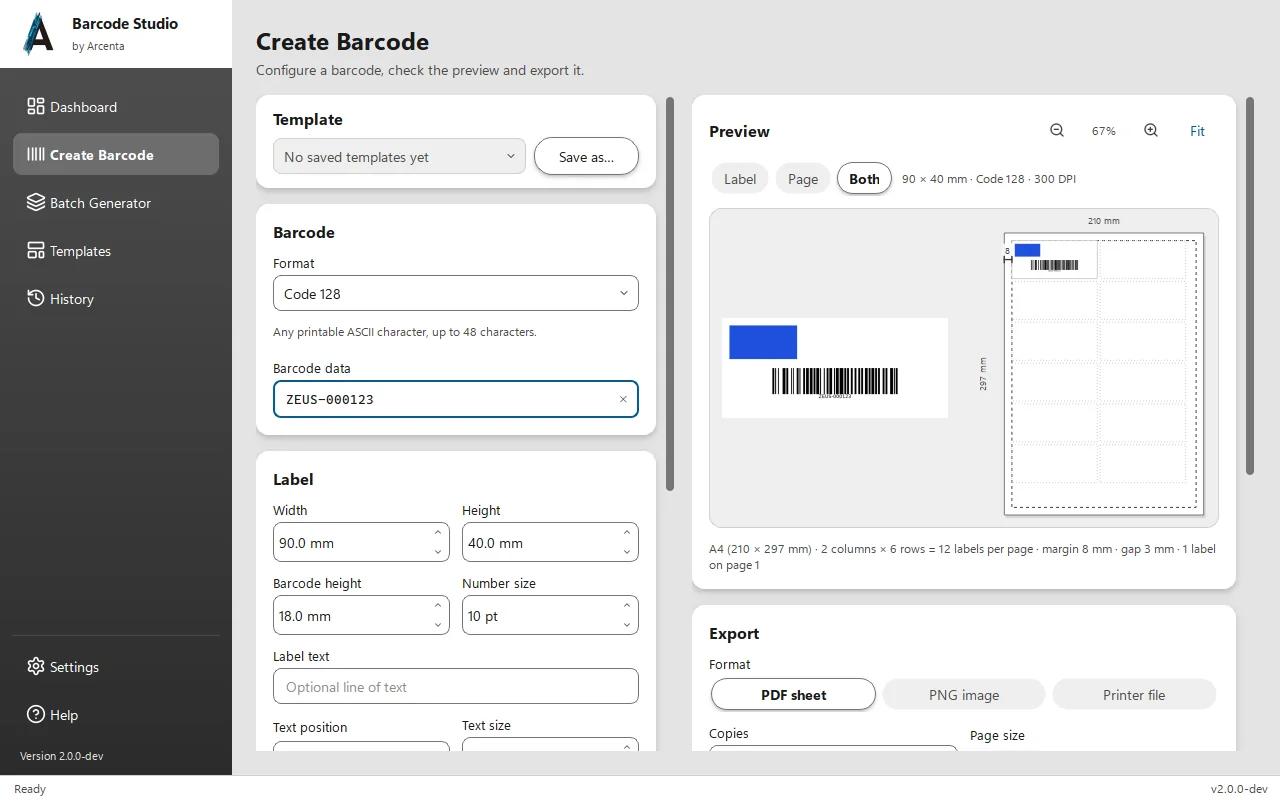
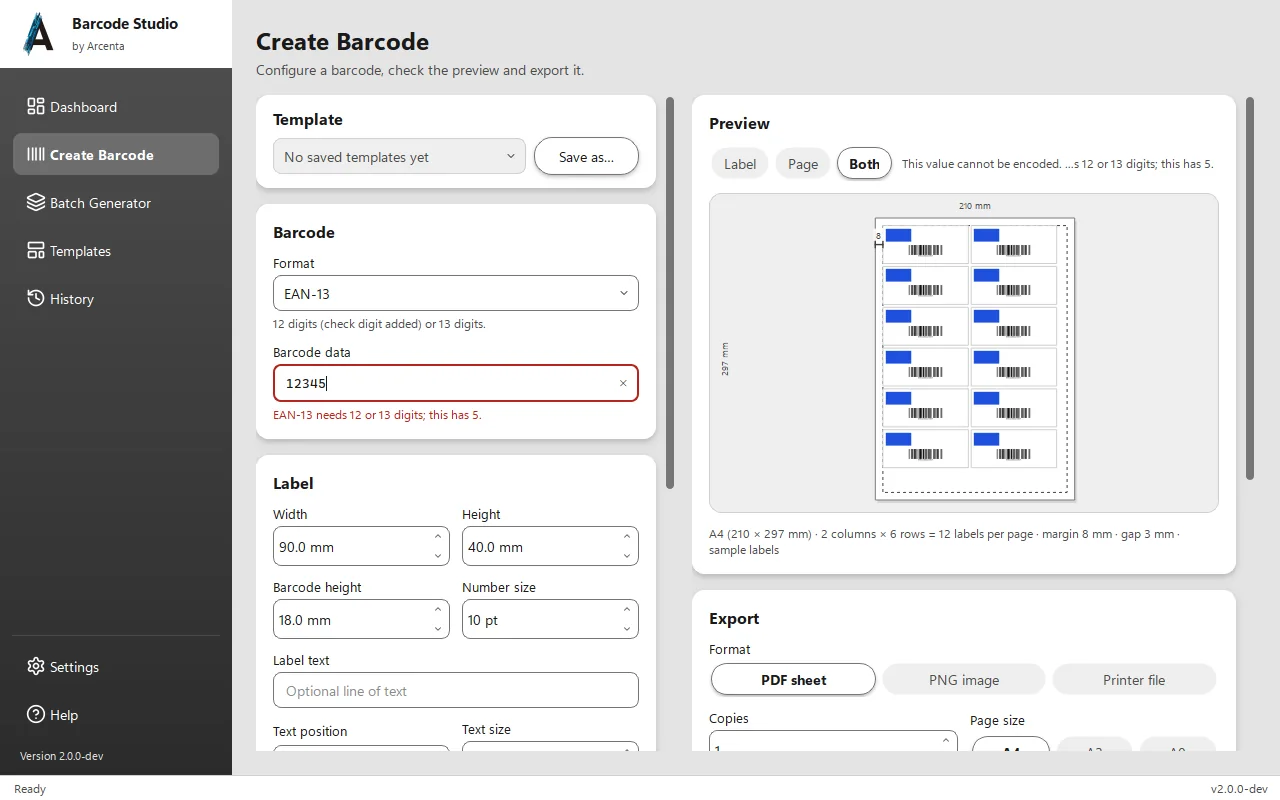
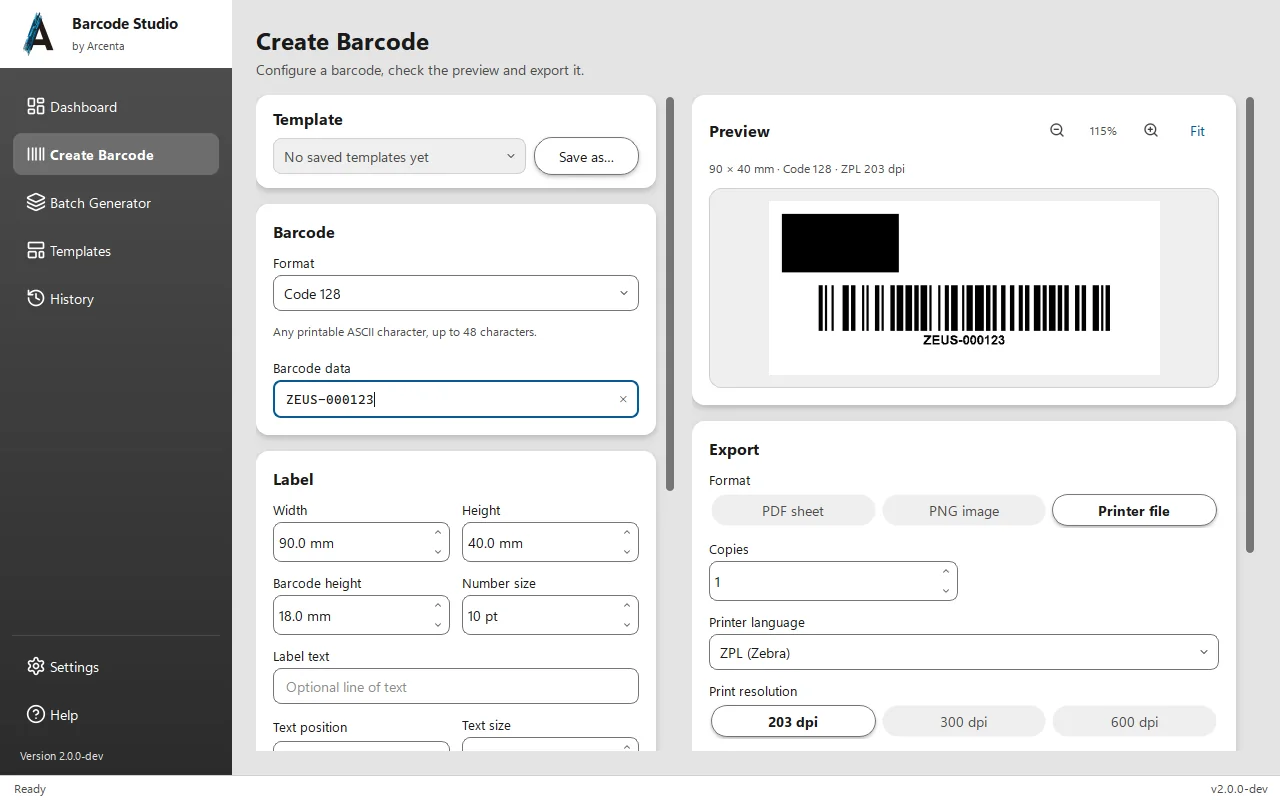
What it handles.
Create
- 01Five barcode types
- Code 128, Code 39, EAN-13, EAN-8 and UPC-A. A value that does not fit the chosen type is flagged as you type.
- 02Live preview
- See the label, the full page, or both, with zoom and fit, before anything is exported. Switch to a printer file and the preview becomes the black-and-white image your printer will receive.
- 03Logo on every label
- Place a PNG company logo in one of three positions and scale it by percentage. Uploaded logos are checked for format, size and pixel limits before use.
Batch
- 01Import Excel or CSV
- Open an .xlsx or CSV file, pick the sheet, and let Auto-detect choose the column that holds the unique barcode data. Remove duplicate values and treat the first row as a header with one tick.
- 02Row-by-row validation
- Every record is validated. Invalid rows are skipped, listed on a Problems tab with row, value and reason, and the full report can be exported.
- 03Thousands of labels in one run
- Tested at 2,500 labels generated in under 20 seconds. The practical limit is disk space and time, not a hard-coded cap.
Printers
- 01Native ZPL, TSPL, DPL and CPCL
- Writes printer files for Zebra (ZPL), TSC (TSPL), Datamax-O’Neil / Honeywell (DPL) and Zebra and other mobile printers (CPCL) at 203, 300 or 600 dpi. The barcode and its digits are sent as native printer commands; the logo and text go as an embedded bitmap.
- 02Test label and file splitting
- Save a test label to check orientation and logo before a full run, and split large runs into several printer files.
Layout
- 01Sheet layout control
- Choose A0, A3 or A4, set margins, the gap between labels and the number of columns, and add optional cut marks. The preview warns when labels do not fit the page.
- 02Templates
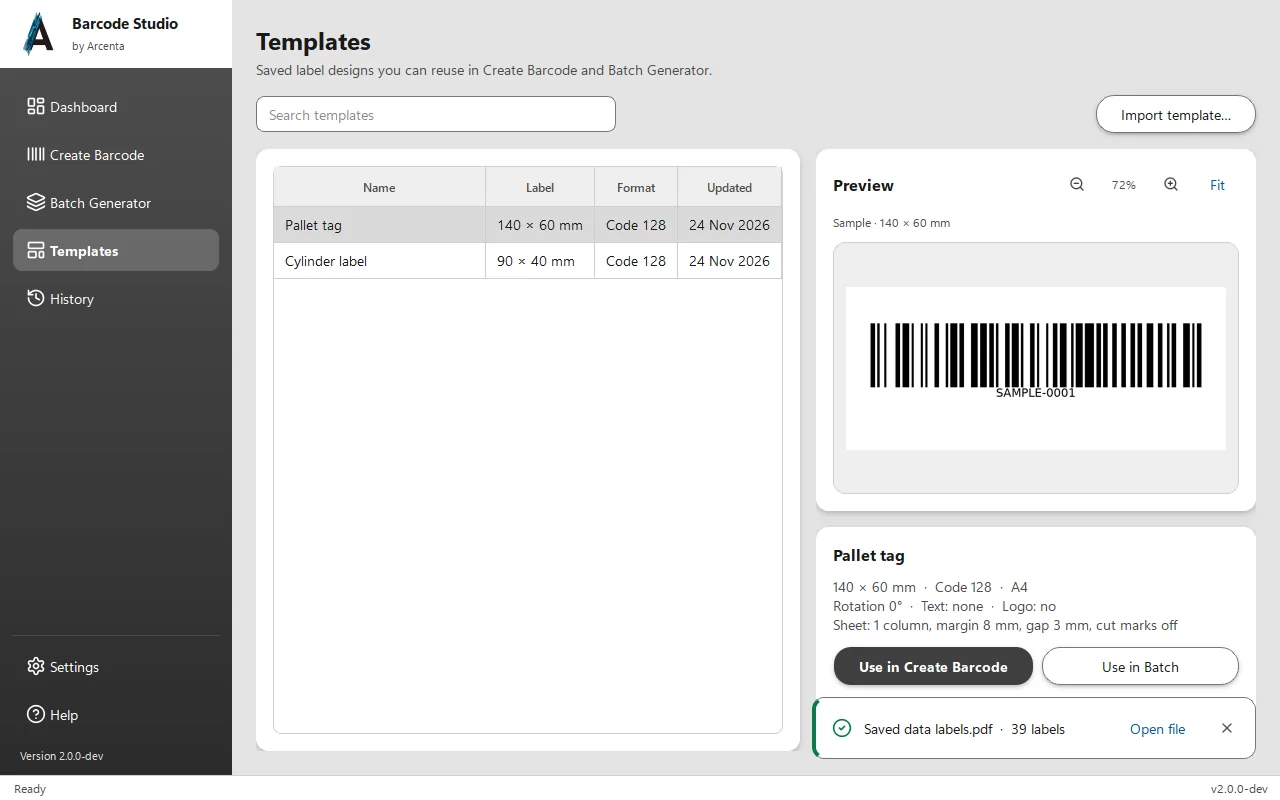
- Save a label design (size, barcode type, logo placement, text) and reuse it in Create Barcode and in the Batch generator. Import a template file to share a design between PCs.
Workflow
- 01Dashboard and history
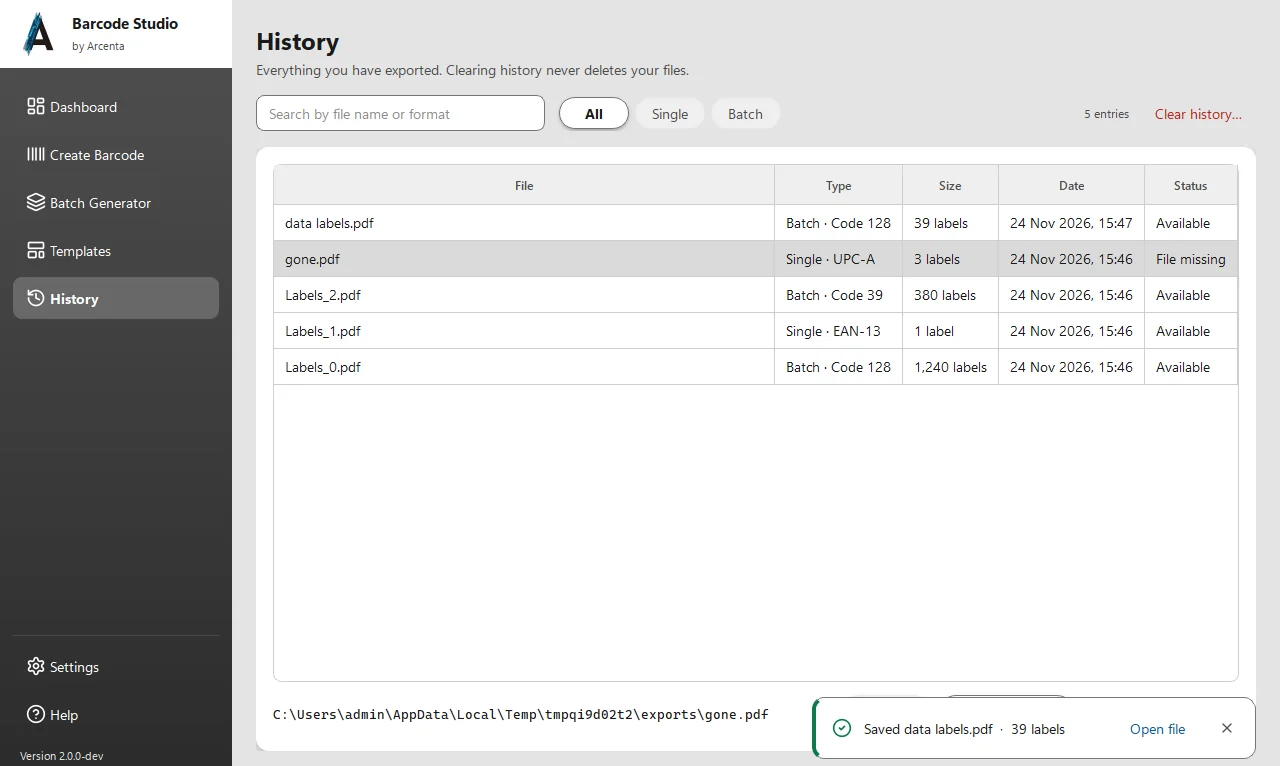
- Reopen recent exports in one click. History keeps file name, barcode type, label count, format and date, never the barcode values or spreadsheet contents.
- 02Keyboard and accessibility
- Full keyboard navigation, screen-reader labels on every control, WCAG-checked colour contrast and high-contrast Windows theme support.
More than the usual.
Most people start with a free online generator, or buy a label-design suite. Barcode Studio is built for the job in between: lots of labels, straight from a spreadsheet, to the printer you already own.
| Feature | Free online generators | Label-design suites | Barcode Studio |
|---|---|---|---|
| Cost | Free, often with limits | Annual subscription is common | One-time licence |
| Internet required | Yes, it runs on a website | Varies; sign-in or online licence checks are common | No. Fully offline, no account |
| Where your data goes | Depends on the website | Depends; cloud features are common | Stays on your PC. Nothing is sent anywhere |
| Whole spreadsheet in one run | Rare; usually one barcode at a time | Yes, usually through a data connection to set up | Yes. Excel or CSV, column auto-detected, 2,500 labels in under 20 s (tested) |
| Validates every row | Rare | Varies | Yes. Bad rows listed with the reason, skipped, exportable report |
| Native ZPL, TSPL, DPL, CPCL | Rare | Often through printer drivers | Yes. Four printer languages at 203, 300 and 600 dpi |
| Company logo on every label | Rare | Yes | Yes. Three positions, scaled and validated |
| Reusable templates | No | Yes | Yes, shared between Create and Batch, importable |
| Time to first label | Seconds | A label designer to learn first | A four-step wizard, no designer to learn |
This compares the general categories of barcode software, not any named product. Free tools and label suites vary widely; check the features of whatever you are evaluating.
Buy it once. Print forever.
Barcode Studio is a one-time licence for one PC. No subscription, no per-label fees, and no internet connection needed to run it. The licence file is tied to your computer, and replacing a disk will not lock you out.
From $149
One-time, per PC, not a subscription. Volume pricing and a short trial licence are available on request. Final price confirmed by proforma invoice.
Request a quoteThis describes how subscription-licensed label software is commonly sold, not any specific product.
What’s actually true.
- Platform
- Windows desktop application, 64-bit. Built with PySide6 (Qt) and compiled to native code. Developed and tested on Windows 11.
- Barcode types
- Code 128, Code 39, EAN-13, EAN-8, UPC-A
- Single export formats
- PDF multi-label sheet (A0, A3, A4) and PNG image
- Printer export formats
- ZPL (Zebra), TSPL (TSC), DPL (Datamax-O’Neil / Honeywell), CPCL (Zebra and mobile printers) at 203, 300 and 600 dpi
- Batch input
- Excel (.xlsx) or CSV with automatic column detection. Tested at 2,500+ labels per run
- Logo
- PNG per label, position and scale configurable, validated before use
- Licensing
- Offline, hardware-locked. No internet connection required to run
- Data privacy
- No barcode values or spreadsheet contents are stored in history or sent over a network. No telemetry
Not yet confirmed — deliberately not stated
- QR codes and other 2D barcodes (not supported yet)
- Windows 10 testing
- macOS and Linux (no build exists)
What it is for.
- Serial-number labels for manufactured parts and cylinders
- Product and pack labels in EAN-13, EAN-8 or UPC-A
- Pallet, carton and shipping tags in Code 128
- Asset, stock and inventory labels carrying your company logo
- Thermal label runs for Zebra, TSC, Datamax-O’Neil / Honeywell and mobile printers
Questions.
Is Barcode Studio a subscription?
No. It is a one-time licence for one PC, starting at $149 USD. The final price is confirmed by proforma invoice.
Does it need an internet connection?
No. It runs fully offline, including licensing. Nothing you create is sent anywhere.
Which barcode types does it support?
Code 128, Code 39, EAN-13, EAN-8 and UPC-A. QR codes are not supported yet.
Which label printers does it support?
Any printer that accepts ZPL, TSPL, DPL or CPCL label commands, which covers most Zebra, TSC, Datamax-O’Neil / Honeywell and mobile label printers. For any other printer, export a PDF or PNG.
How many labels can I make at once?
It has been tested at 2,500 labels generated in under 20 seconds. The practical limit is disk space and time, not a fixed cap.
Can I put my company logo on every label?
Yes. Add a PNG logo in one of three positions and scale it by percentage.
Does it work with Excel and CSV files?
Yes. Import .xlsx or CSV, pick the sheet, and Barcode Studio detects which column holds the unique barcode data. Duplicate values can be removed automatically.
Is my data stored anywhere?
History records only metadata (file name, barcode type, label count, format, date), never barcode values or spreadsheet contents, and nothing is sent over a network.
Does it run on Mac or Linux?
No. Barcode Studio is a Windows desktop application. It was developed and tested on Windows 11.
How do I buy it?
Click Buy now to pay securely online through Dodo Payments, which handles tax and invoicing. If you prefer to pay by bank transfer, request a quote by email and we will send a proforma invoice.
Other ARCENTA software
Inquiries
Interested in Barcode Studio?
Request a demonstration or ask a question. We respond by email; licensing is handled by a mailed proforma invoice, with no payment gateway on this site.