Tube bending & punching · SolidWorks
Pipe geometry,mademachine-ready.
Bendora reads the real pipe geometry from your SolidWorks model and generates the bending and punching program for it, with every station validated before it reaches the floor.
Integrated with SolidWorks.
Software focused on tube bending and punching workflows, integrated with SolidWorks.
Who it’s for.
Engineers and fabricators who design pipe and tube assemblies in SolidWorks and run CNC bending and punching machines.
What it takes out of the process.
- No redrawing the pipe and no manual measuring. Bendora reads the centerline and solid geometry from your model.
- No file export/import round-trip. It connects to the SolidWorks session you already have open.
- No surprises on the floor. Bend and punch die spacing is checked before the program is exported.
One model in, one program out.
- 01
SolidWorks
Your pipe assembly, modeled the way it will actually be built.
- 02
Geometry import
Bendora reads the centerline and solid geometry of the selected pipe directly from the model — no redrawing, no manual measuring.
- 03
Bend & punch analysis
Every bend radius and punch point is detected from the real geometry and checked against your machine's die spacing.
- 04
Program generation
Stations are sequenced into a feed / rotate / angle / op-code program, in the order the pipe actually passes through the machine.
- 05
Machine-ready output
Exported as plain text in the format your bending and punching machines already read.
See the software.
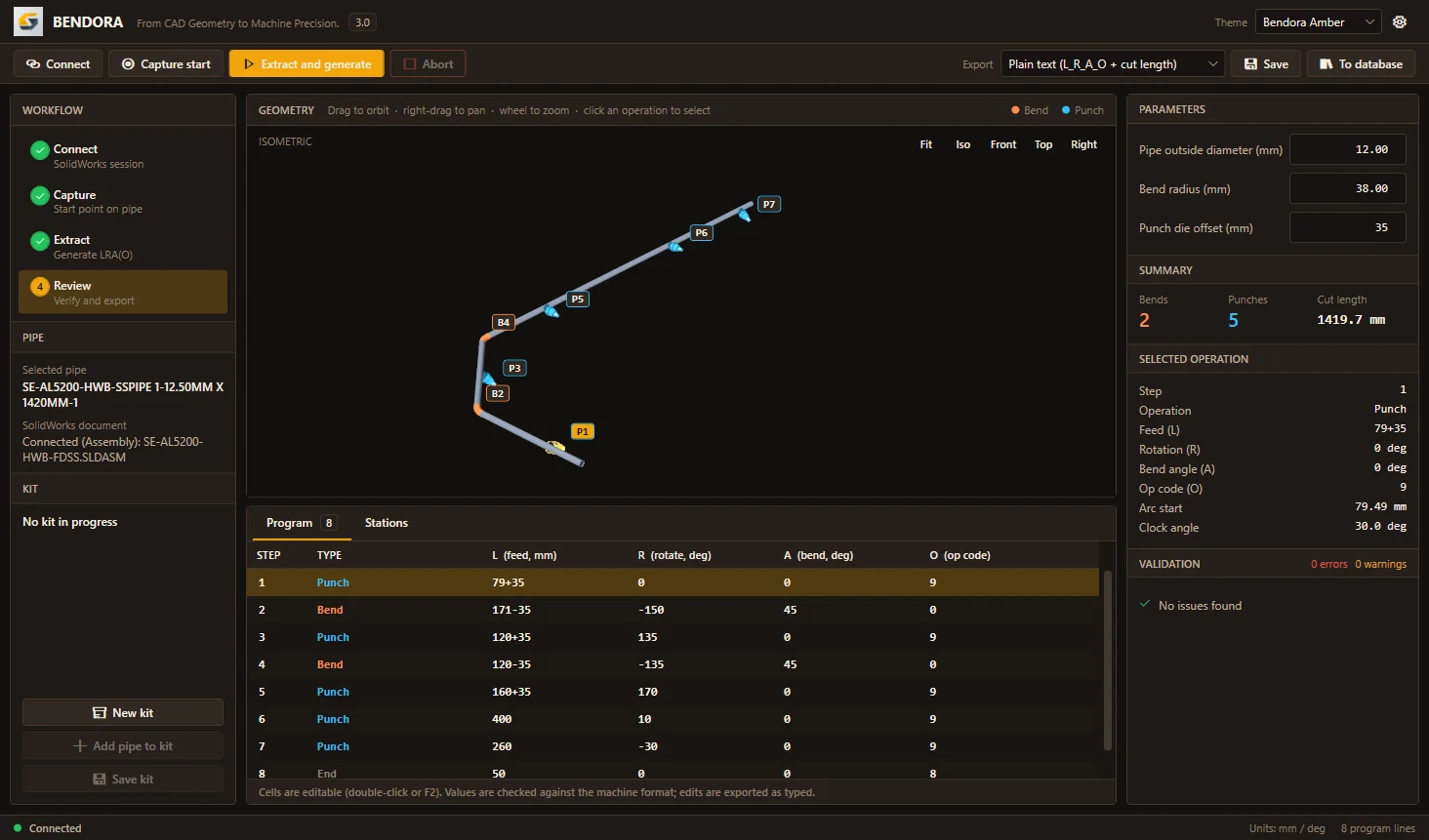
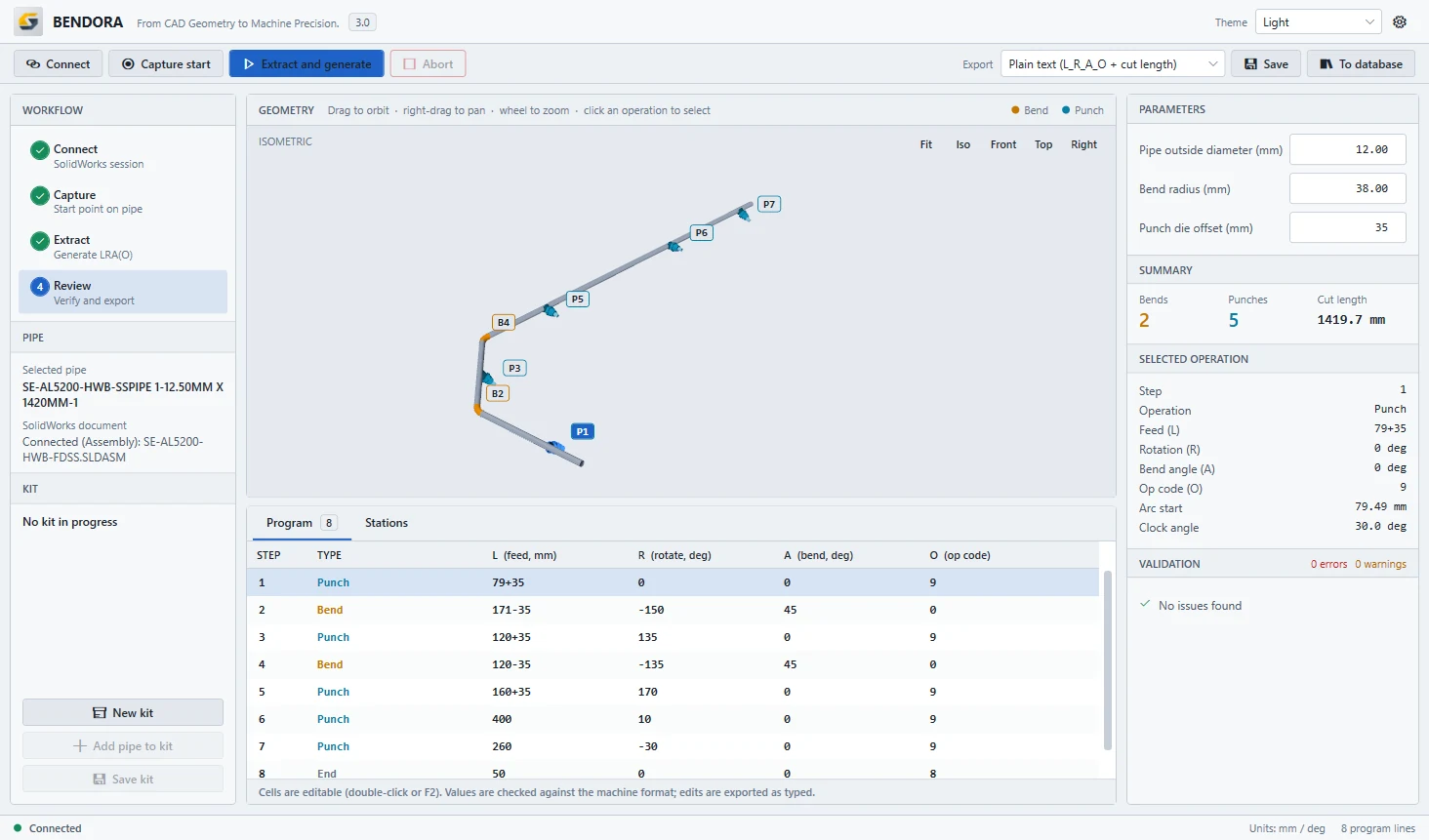
A real program, not a mockup.
Click a station. See exactly what Bendora generated for it.
This is the real output of the sample pipe shown here: the same numbers, from the same run. Every bend and punch is checked against your die spacing automatically, before anything reaches a machine. Programming a complex bent and punched tube by hand can take a person 4 to 6 hours. Bendora generates the program in about 6 seconds.
| Step | Type | L | R | A | O |
|---|---|---|---|---|---|
| 1 | 79+35 | 0 | 0 | 9 | |
| 2 | 171-35 | -150 | 45 | 0 | |
| 3 | 120+35 | 135 | 0 | 9 | |
| 4 | 120-35 | -135 | 45 | 0 | |
| 5 | 160+35 | 170 | 0 | 9 | |
| 6 | 400 | 10 | 0 | 9 | |
| 7 | 260 | -30 | 0 | 9 | |
| 8 | End | 50 | 0 | 0 | 8 |
Station P1 — no issues flagged.
2 bends · 5 punches · 1419.7mm of pipe
What it handles.
Bending
- 01Automatic radius suggestion
- Enter the pipe's outside diameter and Bendora suggests a minimum bend radius using the standard tube-bending multiplier, then lets you override it. The suggestion is a starting point, not a lock.
- 02Multiple die radii on one pipe
- If your pipe uses more than one physical bending die, Bendora detects bends at any of the radii you tell it about, instead of silently skipping the ones that don't match a single configured value.
- 03Configurable bend operation code
- Every machine has its own bend op-code convention. Set yours once in Settings and every generated program uses it.
Punching
- 01Proximity-based detection
- Punch stations are found from the pipe's actual solid geometry and nozzle positions — not hand-measured — using a configurable proximity tolerance.
- 02Configurable punch die offset & op code
- Die offset and operation code are both set once in Settings, matching how your specific punching machine is tooled.
- 03Checked against bend spacing
- A punch placed too close to a bend — closer than your machine's die spacing allows — is flagged before the program ever reaches the floor, not discovered on it.
Four steps, the same ones every time.
Bendora connects to your running SolidWorks session, reads the geometry of the pipe you select, and generates the program from it directly — the exact sequence shown in the app itself.
- 01Connectto the active SolidWorks session.
- 02Capturethe pipe's start point, selected in SolidWorks.
- 03Extractthe bend and punch program from the real geometry.
- 04Reviewthe validated program, then export it.
Buy it once. Keep using it.
A lot of CAM and tube-bending software today is sold as a subscription: pay up front, then keep paying every year just to keep the application working. Bendora is a one-time license.
Starting at $2,500
One-time, per seat — not a subscription. Final price confirmed by proforma invoice.
Request a quoteThis describes how subscription-licensed CAM software in this category is commonly sold, not any specific product. Compare it against whatever you are evaluating.
What’s actually true.
- Platform
- Windows desktop application (64-bit, .NET Framework 4.8)
- SolidWorks requirement
- SolidWorks installed on the same computer. Bendora connects to it through the SolidWorks API and is built against the SolidWorks 2023 API libraries. Ask us about your version.
- System requirements
- No separate CPU or RAM minimum. A computer that meets SolidWorks' own requirements for your version is sufficient for Bendora.
- Machine compatibility
- Machine-independent: Bendora produces a program (plain text or Excel) and you set the op codes and die spacing for your machine. It does not drive a controller directly.
- SolidWorks connection
- Live — reads the part or assembly you already have open via a direct connection, no file export/import round-trip
- Geometry read
- Centerline and solid geometry of the selected pipe
- Program output
- Feed (L), Rotation (R), Bend angle (A), Op code (O), plus total cut length. Export as plain text or as an Excel file
- Bend radius
- Auto-suggested from pipe OD (configurable multiplier), always editable; supports multiple die radii on one pipe
- Validation
- Bend/punch die spacing checked automatically before export
- Licensing
- Offline, hardware-locked — no internet connection required to run
- Themes
- Light and Bendora Amber
Questions.
Is Bendora a subscription?
No. Bendora is a one-time, per-seat licence starting at $2,500 USD. The final price is confirmed by proforma invoice.
Does Bendora need an internet connection?
No. Licensing is offline and hardware-locked, so no internet connection is required to run it.
Do I have to export files from SolidWorks first?
No. Bendora connects to the SolidWorks session you already have open and reads the centerline and solid geometry of the selected pipe, with no file export/import round-trip.
How long does it take to generate a program?
About 6 seconds, even for a complex tube with many bends and punches. Programming the same tube by hand can take a person 4 to 6 hours.
What does Bendora generate?
A program with Feed (L), Rotation (R), Bend angle (A) and Op code (O) for each station, plus the total cut length, which you can export as plain text or as an Excel file. Stations are sequenced in the order the pipe passes through the machine.
Can I change the bend radius Bendora suggests?
Yes. The radius is suggested from the pipe outside diameter using a configurable multiplier and is always editable. Bendora also supports multiple die radii on one pipe.
How does Bendora handle punches close to a bend?
It checks bend and punch die spacing against your machine's configured spacing before export and flags any punch that sits closer to a bend than the spacing allows.
Which SolidWorks versions and machine controllers are supported?
Bendora runs on Windows and connects to SolidWorks installed on the same computer; it is built against the SolidWorks 2023 API libraries. If you use a different SolidWorks version, ask us before you buy. On the machine side, Bendora is not tied to a controller brand: it outputs a text or Excel program and you set your machine's op codes and die spacing.
How do I buy Bendora?
Click Buy now to pay securely online through Dodo Payments, which handles tax and invoicing. If you prefer to pay by bank transfer, request a quote by email and we will send a proforma invoice.
Inquiries
Interested in Bendora?
Request a demonstration or ask a question. We respond by email; licensing is handled by a mailed proforma invoice, with no payment gateway on this site.